

Customer Lifecycle Mapping for a National Route-Based Services Company
Key Points:
- Create an end-to-end view of a complex customer lifecycle spanning product rental, delivery, recurring onsite service, digital interactions, customer support, billing, pickup, and post-service engagement.
- Map how the real customer experience differs from the intended process, exposing communication gaps, repeated contacts, unclear ownership, and friction between customer needs and internal workflows.
- Turn known customer frustrations into a systematic framework for improvement, identifying opportunities for proactive communication, automation, self-service, stronger handoffs, retention, and account growth.
The Challenge
A national route-based services company rents physical equipment that is delivered to customer locations, serviced on a recurring schedule, and eventually picked up. The customer experience spans both physical and digital interactions, including Sales, onsite Operations teams, Customer Support, billing, phone support, email, a customer portal, and automated communications.
Adding to the complexity, there often isn't one single “customer.” The person ordering may be a project manager working from an office, while employees or customers onsite experience the service firsthand. For larger accounts, a third person or department may handle billing without ever interacting with the physical service.
This creates disconnects between who experiences an issue, who reports it, who manages the account, and who pays the bill. Customers may contact the person they know rather than the team designed to help them, repeat issues across departments, or struggle to understand where to go for answers.
My Approach
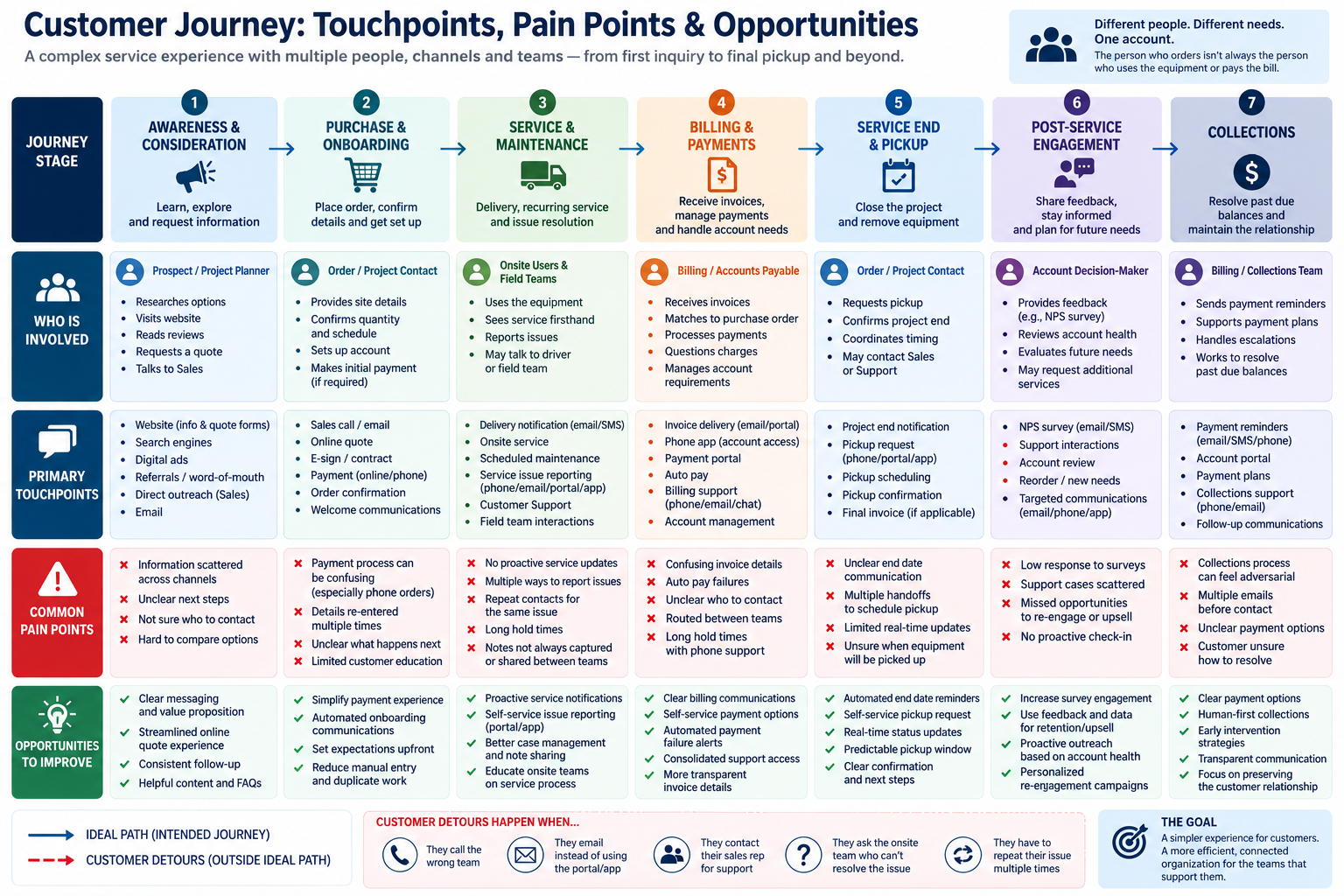
I created the first end-to-end view of the customer lifecycle to understand these known frustrations as part of a larger system rather than as individual support problems. I map seven stages: from awareness and ordering through recurring service, billing, pickup, post-service engagement, and collections. Then I connected the customer-facing experience to the people, channels, systems, and internal teams behind it. Most importantly, I compared the intended customer journey with what people actually do when they need information or help.
What the Journey Reveals
The mapping surfaces several opportunities to make the experience easier for customers while reducing unnecessary internal work:
- Proactive communication & automation: Answer common questions before customers need to contact Sales or Support, particularly around onboarding, recurring service, billing, and project completion.
- Clearer support & handoffs: Make it easier for customers to know where to go while preserving their context when an issue moves between Operations, Support, Sales, and Billing.
- Better use of Sales: Shift repeatable service and account-management interactions away from Sales so they can spend more time developing new business.
- Retention & growth: Use lifecycle signals, service history, feedback, and project timing to identify opportunities for re-engagement, retention, cross-sell, and upsell.
Why Journey Mapping Matters
Support tickets and complaints tell a company what is going wrong, but they don't always explain why the same problems keep happening. Customers don't experience a business as separate departments, systems, and workflows—they're simply trying to get something done. Mapping their actual behavior makes it possible to see where internal processes don't match the human experience of navigating the business.
Once those patterns become visible, seemingly complicated problems can have practical solutions: communicate earlier, clarify ownership, preserve customer context, automate repeatable interactions, or simply make the next step easier to understand. The value of the journey map isn't the map itself, it's moving from repeatedly solving individual customer problems to understanding and addressing the systems that keep creating them.

0 Comments Add a Comment?